Atlassian Data Center Helm Charts 




This project contains Helm charts for installing Atlassian's Jira Data Center, Confluence Data Center, Bitbucket Data Center, Bamboo Data Center and Crowd Data Center on Kubernetes.
Use the charts to install and operate Data Center products within a Kubernetes cluster of your choice. It can be a managed environment, such as Amazon EKS, Azure Kubernetes Service, Google Kubernetes Engine, or a custom on-premise system.
Support disclaimer 
Support Disclaimer
Helm is a Kubernetes package manager that orchestrates the provisioning of applications onto existing Kubernetes infrastructure. The requirements for this infrastructure are described in Prerequisites. The Kubernetes cluster remains your responsibility; we do not provide direct support for Kubernetes or the underlying hardware it runs on.
If you have followed our documentation on how to configure the Helm charts, and you're using correctly created components, we will then provide support if you encounter an error with installation after running the helm install command.
We don’t officially support the functionality described in the examples or the documented platforms. You should use them for reference only.
Read more about what we support and what we don’t.
Certain product limitations listed below:
- Jira currently has limitations with scaling.
- Bamboo has a number of limitations, particularly with deployment and clustering.
Read more about these product and platform limitations.
Architecture 
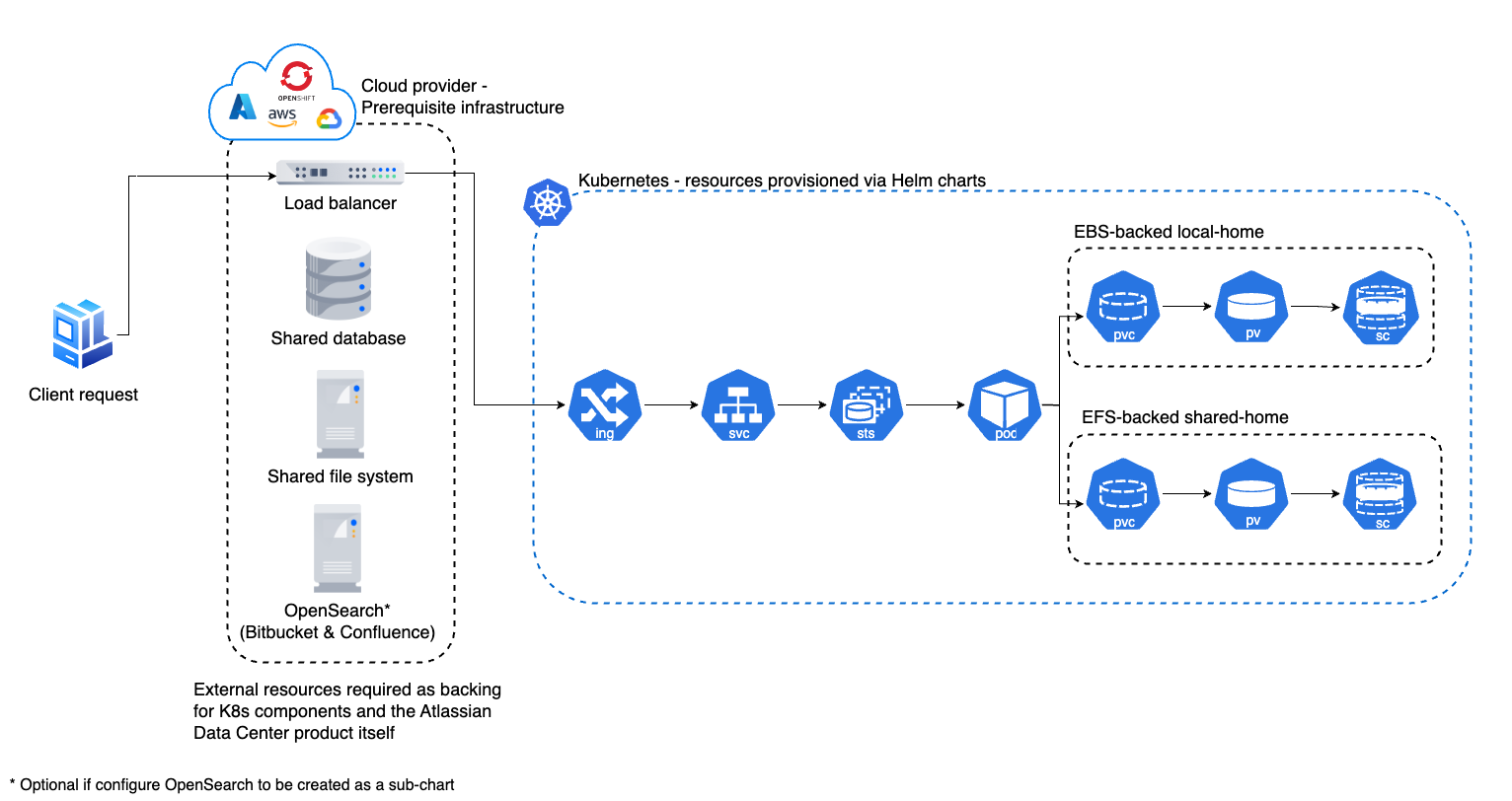
The diagram below provides a high level overview of what a typical deployment might look like when using the Atlassian Data Center Helm charts:
Installing the Helm charts 
- Prerequisites and setup - everything you need to do before installing the Helm charts
- Verification - verify the integrity of the Helm charts
- Installation - the steps to install the Helm charts
- Migration - what you have to do if you're migrating an existing deployment to Kubernetes
Additional content 
- Operation - how to upgrade applications, scale your cluster, and update resources
- Configuration - a deep dive into the configuration parameters
- Platforms support - how to allow support for different platforms
- Examples - various configuration examples
- Troubleshooting - how to debug issues with installation
Product versions 
These Helm charts support all product versions that have not reached End of Life (EOL). Please refer to the Atlassian End of Support Policy to verify that your product version is currently supported.
The Helm charts are product-version agnostic and do not assume or require a specific product version. This means you do not need to wait for a new Helm chart release before upgrading your product to a newer version — the two can be updated independently.
New Helm chart releases typically introduce improvements and new features to make the charts more flexible and easier to configure. Occasionally, a new chart release adds support for new product features, but these are almost always opt-in and will not affect existing deployments unless explicitly configured.
Feedback 
If you find any issues, raise a ticket. If you have general feedback or questions regarding the charts, use Atlassian Community Kubernetes space.
Contributions 
Contributions are welcome. Find out how to contribute.
License 
Apache 2.0 licensed, see license file.